
On This Page
- What is a Transactional Email?
- Types of Transactional Emails
- Transactional Email vs. Marketing Email
- Why Transactional Email Deliverability Matters
- Technical Setup for Transactional Email
- Transactional Email Deliverability Best Practices
- Transactional Email Templates
- Testing Transactional Emails
- Monitoring and Analytics
- Common Transactional Email Mistakes to Avoid
- Advanced Transactional Email Strategies
- Transactional Email with Tajo and Brevo
- Conclusion
Transactional emails are customer-service infrastructure. Order confirmations, password resets, shipping notifications, receipts, account alerts, and security codes are messages people expect immediately. When they fail to reach the inbox, customers lose trust and businesses inherit support tickets.
In this comprehensive guide, we’ll cover everything you need to know about transactional emails: what they are, how they differ from marketing emails, technical setup requirements, deliverability best practices, and templates you can use today.
What is a Transactional Email?
Transactional email is an automated message triggered by a specific user action or system event. Unlike marketing emails sent to promote products or sales, transactional emails deliver critical information that users expect and need.
The defining characteristic of transactional email is that it’s sent to one recipient based on an action they took. The recipient has an existing relationship with the sender and expects to receive the message.
Key Characteristics of Transactional Emails
- User-triggered - Sent in response to a specific action
- Expected - Recipient anticipates receiving the message
- Time-sensitive - Relevant only for a limited time
- One-to-one - Sent to individual recipients, not lists
- Essential information - Contains necessary data, not promotional content
Types of Transactional Emails
Transactional emails cover a wide range of customer communication needs. Here are the most common types:
Account and Authentication Emails
| Email Type | Trigger | Purpose |
|---|---|---|
| Welcome email | Account creation | Confirm registration, provide next steps |
| Password reset | Password reset request | Provide secure reset link |
| Email verification | New email address added | Confirm ownership of email |
| Two-factor authentication | Login attempt | Deliver security code |
| Account update confirmation | Profile changes | Confirm changes were made |
| Security alert | Suspicious activity | Warn user of potential breach |
E-commerce Transaction Emails
| Email Type | Trigger | Purpose |
|---|---|---|
| Order confirmation | Purchase completed | Confirm order details |
| Payment receipt | Payment processed | Provide payment record |
| Shipping notification | Order shipped | Share tracking information |
| Delivery confirmation | Package delivered | Confirm successful delivery |
| Refund notification | Refund processed | Confirm refund details |
| Subscription renewal | Recurring payment | Notify of upcoming charge |
Service and System Emails
| Email Type | Trigger | Purpose |
|---|---|---|
| Appointment confirmation | Booking made | Confirm date, time, details |
| Appointment reminder | Upcoming appointment | Reduce no-shows |
| Invoice | Service rendered | Request payment |
| Support ticket update | Ticket activity | Notify of response |
| Usage alert | Threshold reached | Warn of limit approaching |
| Export/download ready | Data processing complete | Provide download link |
Transactional Email vs. Marketing Email
Understanding the difference between transactional and marketing emails is crucial for compliance, deliverability, and customer experience.
Key Differences
| Aspect | Transactional Email | Marketing Email |
|---|---|---|
| Trigger | User action | Sender decision |
| Expectation | Expected by recipient | May or may not expect |
| Content | Essential information | Promotional content |
| Opt-out | Not required | Required by law |
| Timing | Immediate/time-sensitive | Scheduled campaigns |
| Volume | One at a time | Bulk sends |
| Relationship | Existing customer | Subscriber list |
Legal Distinction
Under CAN-SPAM, GDPR, and other regulations, transactional emails receive special treatment:
- No opt-out required - Since the user triggered the message, they’ve implicitly consented
- No unsubscribe link needed - Though some businesses include one for service emails
- Primary purpose rule - The email’s primary purpose must be transactional, not promotional
Warning: Adding significant promotional content to transactional emails can reclassify them as marketing emails, requiring opt-out compliance.
The Gray Area: Transactional-Marketing Hybrid
Some emails blur the line:
- Order confirmation with product recommendations - Acceptable if recommendations are secondary
- Shipping notification with discount code - May be considered marketing
- Password reset with “check out what’s new” - Problematic mixing
Best practice: Keep transactional emails focused. If you include promotional content, make it clearly secondary to the service message and make sure the primary purpose remains transactional.
Why Transactional Email Deliverability Matters
Transactional emails carry critical information. When they don’t arrive, the consequences are real:
Business Impact of Failed Delivery
- Lost revenue - Customers can’t complete password resets or verify accounts
- Support burden - “Where’s my order?” tickets flood your inbox
- Customer frustration - Erodes trust in your brand
- Compliance risk - Missing receipts or confirmations can create legal issues
- Churn - Customers abandon brands they can’t trust
Operational Signals to Watch
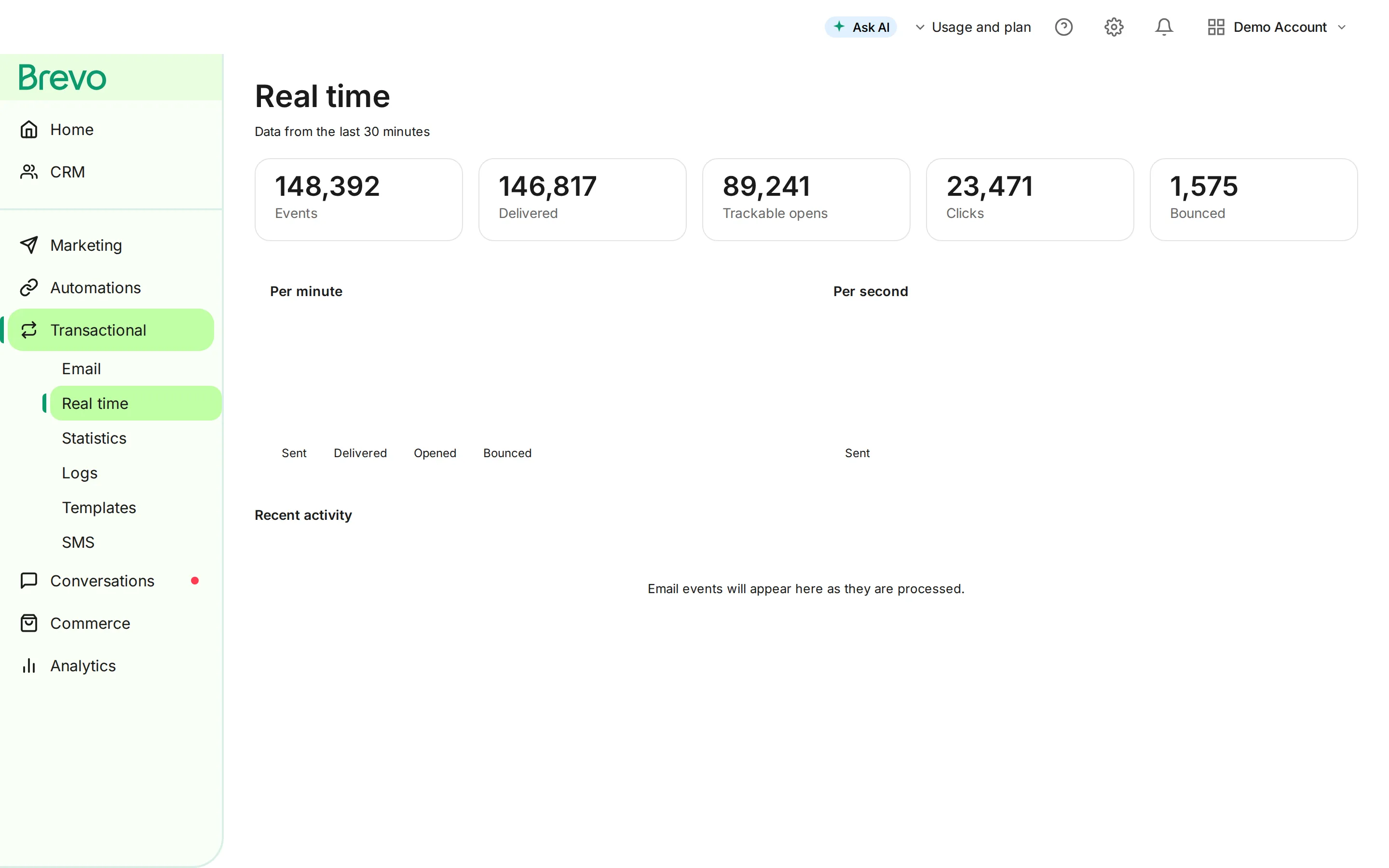
Transactional emails should be easier to observe than marketing campaigns because every event is tied to a user action:
| Signal | Healthy pattern | Investigate when |
|---|---|---|
| Delivery events | Critical messages reach the provider and recipient server quickly | Events are delayed, missing, or concentrated by mailbox provider |
| Bounce handling | Hard bounces are suppressed and not retried indefinitely | The same bad addresses keep receiving attempts |
| Complaint signals | Complaints are rare and reviewed promptly | A template, list source, or sender identity creates repeated complaints |
| Password reset timing | Reset and verification emails arrive while the user is still in-session | Users request multiple links or contact support |
| Provider errors | API and SMTP errors are logged with enough context to replay safely | Failures are only discovered through customer reports |
If these signals degrade, treat it as a product incident, not only a marketing metric problem.
Technical Setup for Transactional Email
Setting up transactional email infrastructure requires attention to authentication, sending methods, and monitoring.
Email Authentication: SPF, DKIM, and DMARC
Email authentication proves to receiving servers that your emails are legitimate. Without proper authentication, your transactional emails may land in spam or be rejected entirely.
SPF (Sender Policy Framework)
SPF tells receiving servers which IP addresses are authorized to send email for your domain.
How to set up SPF:
- Identify all IP addresses and services that send email for your domain
- Create a TXT record in your DNS
- Include your email service provider’s SPF include
v=spf1 include:spf.brevo.com include:_spf.google.com -allSPF best practices:
- Limit to 10 DNS lookups (SPF lookup limit)
- Use
-all(hard fail) for strictest enforcement - Include all legitimate sending sources
- Don’t include services you no longer use
DKIM (DomainKeys Identified Mail)
DKIM adds a cryptographic signature to your emails, allowing recipients to verify the message wasn’t altered in transit.
How to set up DKIM:
- Generate a public/private key pair through your ESP
- Add the public key as a TXT record in your DNS
- Configure your ESP to sign outgoing emails
selector._domainkey.yourdomain.com TXT "v=DKIM1; k=rsa; p=[public-key]"DKIM best practices:
- Use 2048-bit keys (1024-bit is outdated)
- Rotate keys periodically (annually minimum)
- Use unique selectors for different services
- Verify signatures are passing with tools like MXToolbox
DMARC (Domain-based Message Authentication, Reporting & Conformance)
DMARC tells receiving servers what to do with emails that fail SPF and DKIM checks.
How to set up DMARC:
- Start with a monitoring policy (p=none)
- Add a TXT record at _dmarc.yourdomain.com
- Monitor reports and adjust policy
Progressive DMARC implementation:
# Stage 1: Monitor onlyv=DMARC1; p=none; rua=mailto:[email protected]
# Stage 2: Quarantine failuresv=DMARC1; p=quarantine; pct=25; rua=mailto:[email protected]
# Stage 3: Full enforcementv=DMARC1; p=reject; rua=mailto:[email protected]
DMARC best practices:
- Never jump straight to p=reject
- Monitor reports for several weeks at each stage
- Increase pct (percentage) gradually
- Fix authentication issues before enforcing
Sending Methods: SMTP vs. API
You have two primary options for sending transactional emails: SMTP relay or API integration.
SMTP Relay
Traditional email sending protocol. Your application connects to an SMTP server to send messages.
Pros:
- Universal support - works with any email-capable application
- Easy to set up with existing systems
- No code changes required for basic implementation
Cons:
- Slower than API (connection overhead)
- Limited feedback on delivery status
- Less control over message formatting
SMTP configuration example:
Host: smtp-relay.brevo.comPort: 587 (TLS) or 465 (SSL)Username: your-api-keyPassword: your-api-keyAuthentication: RequiredAPI Integration
Direct integration with your email service provider’s API for programmatic sending.
Pros:
- Faster delivery (no SMTP handshake)
- Rich delivery and engagement data
- Better error handling
- Template management capabilities
- Batch sending support
Cons:
- Requires code integration
- Provider-specific implementation
- More complex initial setup
API sending example (conceptual):
// Example transactional email via APIconst emailData = { templateId: 123, params: { orderNumber: "ORD-12345", orderTotal: "$99.99", trackingUrl: "https://tracking.example.com/12345" }};
await emailService.sendTransactional(emailData);Which to Choose?
| Scenario | Recommendation |
|---|---|
| Legacy system integration | SMTP |
| Modern web application | API |
| High volume or event-rich sending | API |
| Need detailed delivery tracking | API |
| Quick implementation | SMTP |
| Template management | API |
Choosing a Transactional Email Provider
Key factors when selecting a transactional email service:
Deliverability:
- Reputation management
- Dedicated IP options
- Authentication support
- ISP relationships
Reliability:
- Uptime SLA (99.9%+ minimum)
- Global infrastructure
- Failover capabilities
- Queue management
Features:
- Template management
- Delivery tracking
- Webhook notifications
- Analytics dashboard
- API documentation quality
Pricing:
- Cost per email
- Volume discounts
- Included features
- Overage charges
Transactional Email Deliverability Best Practices
Achieving 99%+ delivery rates requires attention to multiple factors.
Separate Transactional and Marketing Streams
Never send transactional and marketing emails from the same IP address or domain.
Why separation matters:
- Marketing emails generate more complaints and bounces
- Poor marketing reputation affects transactional delivery
- Different sending patterns confuse ISP algorithms
- Easier to troubleshoot issues with separate streams
Implementation options:
- Subdomain:
transact.yourdomain.comfor transactional,marketing.yourdomain.comfor campaigns - Separate IPs: Dedicated IP for transactional on main domain
- Different providers: Use specialized transactional provider
Maintain a Clean Sender Reputation
Your sender reputation directly impacts deliverability.
Reputation factors:
- Bounce rate (hard bounces hurt most)
- Complaint rate (spam reports)
- Spam trap hits
- Engagement metrics
- Sending volume consistency
How to protect your reputation:
- Process bounces immediately
- Remove invalid addresses
- Monitor feedback loops
- Authenticate all emails
- Warm up new IPs gradually
Monitor Delivery Metrics
Track these metrics daily:
| Metric | Target | Action if Below |
|---|---|---|
| Delivery rate | >99% | Check bounces, authentication |
| Bounce rate | <0.5% | Clean list, validate addresses |
| Spam complaint rate | <0.01% | Review content, segmentation |
| Time to deliver | <30 seconds | Check provider performance |
Handle Bounces Properly
Hard bounces: Invalid addresses - remove immediately Soft bounces: Temporary issues - retry with exponential backoff
Bounce handling workflow:
- Receive bounce notification
- Classify as hard or soft
- Hard bounce: Suppress address immediately
- Soft bounce: Retry up to 3 times over 72 hours
- After 3 soft bounces: Treat as hard bounce
-
Bounce notification received
-
Classify as hard or soft
-
Hard bounce: act immediately
Suppress the address
- Invalid address; never retried
-
Soft bounce: temporary issue
Retry with exponential backoff
- Up to 3 times over 72 hours
-
After 3 soft bounces
Treat as a hard bounce
Content Best Practices
Even with perfect technical setup, poor content can trigger spam filters.
Subject lines:
- Be clear and specific (“Your order #12345 has shipped”)
- Avoid spam trigger words
- Include relevant identifiers (order number, account name)
Body content:
- Keep text-to-image ratio balanced
- Include plain text version
- Avoid excessive links
- Don’t use link shorteners
- Include legitimate contact information
HTML best practices:
- Use tables for layout (email client compatibility)
- Inline CSS styles
- Test across email clients
- Keep code clean and valid
- Optimize images for size
Transactional Email Templates
Here are ready-to-use templates for common transactional emails.
Order Confirmation Template
- From
- [COMPANY_NAME]
- Subject
- Order Confirmed - #[ORDER_NUMBER]
View the Brevo-ready HTML
<!DOCTYPE html>
<html lang="en" xmlns="http://www.w3.org/1999/xhtml" xmlns:v="urn:schemas-microsoft-com:vml" xmlns:o="urn:schemas-microsoft-com:office:office">
<head>
<meta charset="utf-8">
<meta name="viewport" content="width=device-width,initial-scale=1">
<meta name="x-apple-disable-message-reformatting">
<meta name="color-scheme" content="light">
<meta name="supported-color-schemes" content="light">
<title>Order Confirmed - #[ORDER_NUMBER]</title>
<!--[if mso]><noscript><xml><o:OfficeDocumentSettings><o:PixelsPerInch>96</o:PixelsPerInch></o:OfficeDocumentSettings></xml></noscript><![endif]-->
</head>
<body style="margin:0;padding:0;background-color:#f4f4f5;">
<!-- Preheader: put the inbox preview text in this span, or use Brevo's preview text field. -->
<span style="display:none;font-size:1px;color:#f4f4f5;line-height:1px;max-height:0;max-width:0;opacity:0;overflow:hidden;mso-hide:all;"></span>
<!-- Subject line (paste into Brevo's subject field): Order Confirmed - #[ORDER_NUMBER] -->
<!-- Links point to https://example.com; replace them with your own before sending. -->
<table role="presentation" width="100%" cellpadding="0" cellspacing="0" border="0" style="background-color:#f4f4f5;">
<tr><td align="center" style="padding:24px 12px;">
<!--[if mso]><table role="presentation" width="600" cellpadding="0" cellspacing="0" border="0"><tr><td><![endif]-->
<table role="presentation" width="100%" cellpadding="0" cellspacing="0" border="0" style="max-width:600px;background-color:#ffffff;border:1px solid #e4e4e7;border-radius:8px;">
<tr><td style="height:40px;font-size:0;line-height:0;"> </td></tr>
<tr><td style="padding:0 40px 16px;font-family:-apple-system,BlinkMacSystemFont,'Segoe UI',Roboto,Helvetica,Arial,sans-serif;font-size:16px;line-height:1.6;color:#18181b;"><p style="margin:0;">Hi [CUSTOMER_NAME],</p></td></tr>
<tr><td style="padding:0 40px 16px;font-family:-apple-system,BlinkMacSystemFont,'Segoe UI',Roboto,Helvetica,Arial,sans-serif;font-size:16px;line-height:1.6;color:#18181b;"><p style="margin:0;">Thank you for your order!</p></td></tr>
<tr><td style="padding:8px 40px 12px;font-family:-apple-system,BlinkMacSystemFont,'Segoe UI',Roboto,Helvetica,Arial,sans-serif;font-size:16px;line-height:1.6;color:#18181b;"><h2 style="margin:0;font-family:-apple-system,BlinkMacSystemFont,'Segoe UI',Roboto,Helvetica,Arial,sans-serif;font-size:18px;line-height:1.3;font-weight:700;color:#18181b;">ORDER DETAILS</h2></td></tr>
<tr><td style="padding:0 40px 16px;font-family:-apple-system,BlinkMacSystemFont,'Segoe UI',Roboto,Helvetica,Arial,sans-serif;font-size:16px;line-height:1.6;color:#18181b;"><p style="margin:0;">Order Number: [ORDER_NUMBER]<br>Order Date: [ORDER_DATE]</p></td></tr>
<tr><td style="padding:8px 40px 12px;font-family:-apple-system,BlinkMacSystemFont,'Segoe UI',Roboto,Helvetica,Arial,sans-serif;font-size:16px;line-height:1.6;color:#18181b;"><h2 style="margin:0;font-family:-apple-system,BlinkMacSystemFont,'Segoe UI',Roboto,Helvetica,Arial,sans-serif;font-size:18px;line-height:1.3;font-weight:700;color:#18181b;">ITEMS ORDERED</h2></td></tr>
<tr><td style="padding:0 40px 16px;font-family:-apple-system,BlinkMacSystemFont,'Segoe UI',Roboto,Helvetica,Arial,sans-serif;font-size:16px;line-height:1.6;color:#18181b;"><p style="margin:0;">[PRODUCT_NAME] x [QUANTITY] - [PRICE]<br>[PRODUCT_NAME] x [QUANTITY] - [PRICE]</p></td></tr>
<tr><td style="padding:0 40px 16px;font-family:-apple-system,BlinkMacSystemFont,'Segoe UI',Roboto,Helvetica,Arial,sans-serif;font-size:16px;line-height:1.6;color:#18181b;"><p style="margin:0;">Subtotal: [SUBTOTAL]<br>Shipping: [SHIPPING_COST]<br>Tax: [TAX]</p></td></tr>
<tr><td style="padding:8px 40px 24px;"><table role="presentation" width="100%" cellpadding="0" cellspacing="0" border="0"><tr><td style="border-top:1px solid #e4e4e7;font-size:0;line-height:0;"> </td></tr></table></td></tr>
<tr><td style="padding:0 40px 16px;font-family:-apple-system,BlinkMacSystemFont,'Segoe UI',Roboto,Helvetica,Arial,sans-serif;font-size:16px;line-height:1.6;color:#18181b;"><p style="margin:0;">Total: [ORDER_TOTAL]</p></td></tr>
<tr><td style="padding:8px 40px 12px;font-family:-apple-system,BlinkMacSystemFont,'Segoe UI',Roboto,Helvetica,Arial,sans-serif;font-size:16px;line-height:1.6;color:#18181b;"><h2 style="margin:0;font-family:-apple-system,BlinkMacSystemFont,'Segoe UI',Roboto,Helvetica,Arial,sans-serif;font-size:18px;line-height:1.3;font-weight:700;color:#18181b;">SHIPPING ADDRESS</h2></td></tr>
<tr><td style="padding:0 40px 16px;font-family:-apple-system,BlinkMacSystemFont,'Segoe UI',Roboto,Helvetica,Arial,sans-serif;font-size:16px;line-height:1.6;color:#18181b;"><p style="margin:0;">[SHIPPING_NAME]<br>[SHIPPING_ADDRESS_LINE1]<br>[SHIPPING_ADDRESS_LINE2]<br>[SHIPPING_CITY], [SHIPPING_STATE] [SHIPPING_ZIP]<br>[SHIPPING_COUNTRY]</p></td></tr>
<tr><td style="padding:8px 40px 12px;font-family:-apple-system,BlinkMacSystemFont,'Segoe UI',Roboto,Helvetica,Arial,sans-serif;font-size:16px;line-height:1.6;color:#18181b;"><h2 style="margin:0;font-family:-apple-system,BlinkMacSystemFont,'Segoe UI',Roboto,Helvetica,Arial,sans-serif;font-size:18px;line-height:1.3;font-weight:700;color:#18181b;">ESTIMATED DELIVERY</h2></td></tr>
<tr><td style="padding:0 40px 16px;font-family:-apple-system,BlinkMacSystemFont,'Segoe UI',Roboto,Helvetica,Arial,sans-serif;font-size:16px;line-height:1.6;color:#18181b;"><p style="margin:0;">[DELIVERY_ESTIMATE]</p></td></tr>
<tr><td style="padding:0 40px 16px;font-family:-apple-system,BlinkMacSystemFont,'Segoe UI',Roboto,Helvetica,Arial,sans-serif;font-size:16px;line-height:1.6;color:#18181b;"><p style="margin:0;">We'll send you a tracking number as soon as your order ships.</p></td></tr>
<tr><td style="padding:0 40px 16px;font-family:-apple-system,BlinkMacSystemFont,'Segoe UI',Roboto,Helvetica,Arial,sans-serif;font-size:16px;line-height:1.6;color:#18181b;"><p style="margin:0;">Questions? Reply to this email or visit our Help Center: [HELP_CENTER_URL]</p></td></tr>
<tr><td style="padding:0 40px 16px;font-family:-apple-system,BlinkMacSystemFont,'Segoe UI',Roboto,Helvetica,Arial,sans-serif;font-size:16px;line-height:1.6;color:#18181b;"><p style="margin:0;">Thank you for shopping with us!</p></td></tr>
<tr><td style="padding:0 40px 16px;font-family:-apple-system,BlinkMacSystemFont,'Segoe UI',Roboto,Helvetica,Arial,sans-serif;font-size:16px;line-height:1.6;color:#18181b;"><p style="margin:0;">[COMPANY_NAME]</p></td></tr>
<tr><td style="padding:24px 40px 32px;border-top:1px solid #e4e4e7;font-family:-apple-system,BlinkMacSystemFont,'Segoe UI',Roboto,Helvetica,Arial,sans-serif;font-size:13px;line-height:1.6;color:#52525b;"><a href="{{ unsubscribe }}" target="_blank" style="color:#52525b;text-decoration:underline;">Unsubscribe</a></td></tr>
</table>
<!--[if mso]></td></tr></table><![endif]-->
</td></tr>
</table>
</body>
</html>
Shipping Notification Template
- From
- [COMPANY_NAME]
- Subject
- Your order #[ORDER_NUMBER] is on its way!
View the Brevo-ready HTML
<!DOCTYPE html>
<html lang="en" xmlns="http://www.w3.org/1999/xhtml" xmlns:v="urn:schemas-microsoft-com:vml" xmlns:o="urn:schemas-microsoft-com:office:office">
<head>
<meta charset="utf-8">
<meta name="viewport" content="width=device-width,initial-scale=1">
<meta name="x-apple-disable-message-reformatting">
<meta name="color-scheme" content="light">
<meta name="supported-color-schemes" content="light">
<title>Your order #[ORDER_NUMBER] is on its way!</title>
<!--[if mso]><noscript><xml><o:OfficeDocumentSettings><o:PixelsPerInch>96</o:PixelsPerInch></o:OfficeDocumentSettings></xml></noscript><![endif]-->
</head>
<body style="margin:0;padding:0;background-color:#f4f4f5;">
<!-- Preheader: put the inbox preview text in this span, or use Brevo's preview text field. -->
<span style="display:none;font-size:1px;color:#f4f4f5;line-height:1px;max-height:0;max-width:0;opacity:0;overflow:hidden;mso-hide:all;"></span>
<!-- Subject line (paste into Brevo's subject field): Your order #[ORDER_NUMBER] is on its way! -->
<!-- Links point to https://example.com; replace them with your own before sending. -->
<table role="presentation" width="100%" cellpadding="0" cellspacing="0" border="0" style="background-color:#f4f4f5;">
<tr><td align="center" style="padding:24px 12px;">
<!--[if mso]><table role="presentation" width="600" cellpadding="0" cellspacing="0" border="0"><tr><td><![endif]-->
<table role="presentation" width="100%" cellpadding="0" cellspacing="0" border="0" style="max-width:600px;background-color:#ffffff;border:1px solid #e4e4e7;border-radius:8px;">
<tr><td style="height:40px;font-size:0;line-height:0;"> </td></tr>
<tr><td style="padding:0 40px 16px;font-family:-apple-system,BlinkMacSystemFont,'Segoe UI',Roboto,Helvetica,Arial,sans-serif;font-size:16px;line-height:1.6;color:#18181b;"><p style="margin:0;">Great news, [CUSTOMER_NAME]!</p></td></tr>
<tr><td style="padding:0 40px 16px;font-family:-apple-system,BlinkMacSystemFont,'Segoe UI',Roboto,Helvetica,Arial,sans-serif;font-size:16px;line-height:1.6;color:#18181b;"><p style="margin:0;">Your order has shipped and is on its way to you.</p></td></tr>
<tr><td style="padding:8px 40px 12px;font-family:-apple-system,BlinkMacSystemFont,'Segoe UI',Roboto,Helvetica,Arial,sans-serif;font-size:16px;line-height:1.6;color:#18181b;"><h2 style="margin:0;font-family:-apple-system,BlinkMacSystemFont,'Segoe UI',Roboto,Helvetica,Arial,sans-serif;font-size:18px;line-height:1.3;font-weight:700;color:#18181b;">TRACKING INFORMATION</h2></td></tr>
<tr><td style="padding:0 40px 16px;font-family:-apple-system,BlinkMacSystemFont,'Segoe UI',Roboto,Helvetica,Arial,sans-serif;font-size:16px;line-height:1.6;color:#18181b;"><p style="margin:0;">Carrier: [CARRIER_NAME]<br>Tracking Number: [TRACKING_NUMBER]</p></td></tr>
<tr><td style="padding:8px 40px 24px;">
<table role="presentation" cellpadding="0" cellspacing="0" border="0"><tr><td align="center" bgcolor="#18181b" style="border-radius:6px;background-color:#18181b;">
<!--[if mso]><v:roundrect xmlns:v="urn:schemas-microsoft-com:vml" xmlns:w="urn:schemas-microsoft-com:office:word" href="https://example.com" style="height:48px;v-text-anchor:middle;width:280px;" arcsize="12%" stroke="f" fillcolor="#18181b"><w:anchorlock/><center style="color:#ffffff;font-family:Arial,sans-serif;font-size:16px;font-weight:bold;">TRACK_YOUR_PACKAGE</center></v:roundrect><![endif]-->
<!--[if !mso]><!--><a href="https://example.com" target="_blank" style="display:inline-block;padding:14px 28px;font-family:-apple-system,BlinkMacSystemFont,'Segoe UI',Roboto,Helvetica,Arial,sans-serif;font-size:16px;font-weight:600;line-height:20px;color:#ffffff;text-decoration:none;border-radius:6px;background-color:#18181b;mso-hide:all;">TRACK_YOUR_PACKAGE</a><!--<![endif]-->
</td></tr></table>
</td></tr>
<tr><td style="padding:8px 40px 12px;font-family:-apple-system,BlinkMacSystemFont,'Segoe UI',Roboto,Helvetica,Arial,sans-serif;font-size:16px;line-height:1.6;color:#18181b;"><h2 style="margin:0;font-family:-apple-system,BlinkMacSystemFont,'Segoe UI',Roboto,Helvetica,Arial,sans-serif;font-size:18px;line-height:1.3;font-weight:700;color:#18181b;">ESTIMATED DELIVERY</h2></td></tr>
<tr><td style="padding:0 40px 16px;font-family:-apple-system,BlinkMacSystemFont,'Segoe UI',Roboto,Helvetica,Arial,sans-serif;font-size:16px;line-height:1.6;color:#18181b;"><p style="margin:0;">[DELIVERY_DATE]</p></td></tr>
<tr><td style="padding:8px 40px 12px;font-family:-apple-system,BlinkMacSystemFont,'Segoe UI',Roboto,Helvetica,Arial,sans-serif;font-size:16px;line-height:1.6;color:#18181b;"><h2 style="margin:0;font-family:-apple-system,BlinkMacSystemFont,'Segoe UI',Roboto,Helvetica,Arial,sans-serif;font-size:18px;line-height:1.3;font-weight:700;color:#18181b;">SHIPPING TO</h2></td></tr>
<tr><td style="padding:0 40px 16px;font-family:-apple-system,BlinkMacSystemFont,'Segoe UI',Roboto,Helvetica,Arial,sans-serif;font-size:16px;line-height:1.6;color:#18181b;"><p style="margin:0;">[SHIPPING_NAME]<br>[SHIPPING_ADDRESS]</p></td></tr>
<tr><td style="padding:8px 40px 12px;font-family:-apple-system,BlinkMacSystemFont,'Segoe UI',Roboto,Helvetica,Arial,sans-serif;font-size:16px;line-height:1.6;color:#18181b;"><h2 style="margin:0;font-family:-apple-system,BlinkMacSystemFont,'Segoe UI',Roboto,Helvetica,Arial,sans-serif;font-size:18px;line-height:1.3;font-weight:700;color:#18181b;">ORDER SUMMARY</h2></td></tr>
<tr><td style="padding:0 40px 16px;font-family:-apple-system,BlinkMacSystemFont,'Segoe UI',Roboto,Helvetica,Arial,sans-serif;font-size:16px;line-height:1.6;color:#18181b;"><p style="margin:0;">[PRODUCT_LIST]</p></td></tr>
<tr><td style="padding:0 40px 16px;font-family:-apple-system,BlinkMacSystemFont,'Segoe UI',Roboto,Helvetica,Arial,sans-serif;font-size:16px;line-height:1.6;color:#18181b;"><p style="margin:0;">Need help? Contact us at [SUPPORT_EMAIL]</p></td></tr>
<tr><td style="padding:0 40px 16px;font-family:-apple-system,BlinkMacSystemFont,'Segoe UI',Roboto,Helvetica,Arial,sans-serif;font-size:16px;line-height:1.6;color:#18181b;"><p style="margin:0;">[COMPANY_NAME]</p></td></tr>
<tr><td style="padding:24px 40px 32px;border-top:1px solid #e4e4e7;font-family:-apple-system,BlinkMacSystemFont,'Segoe UI',Roboto,Helvetica,Arial,sans-serif;font-size:13px;line-height:1.6;color:#52525b;"><a href="{{ unsubscribe }}" target="_blank" style="color:#52525b;text-decoration:underline;">Unsubscribe</a></td></tr>
</table>
<!--[if mso]></td></tr></table><![endif]-->
</td></tr>
</table>
</body>
</html>
Password Reset Template
- From
- [COMPANY_NAME]
- Subject
- Reset your [COMPANY_NAME] password
View the Brevo-ready HTML
<!DOCTYPE html>
<html lang="en" xmlns="http://www.w3.org/1999/xhtml" xmlns:v="urn:schemas-microsoft-com:vml" xmlns:o="urn:schemas-microsoft-com:office:office">
<head>
<meta charset="utf-8">
<meta name="viewport" content="width=device-width,initial-scale=1">
<meta name="x-apple-disable-message-reformatting">
<meta name="color-scheme" content="light">
<meta name="supported-color-schemes" content="light">
<title>Reset your [COMPANY_NAME] password</title>
<!--[if mso]><noscript><xml><o:OfficeDocumentSettings><o:PixelsPerInch>96</o:PixelsPerInch></o:OfficeDocumentSettings></xml></noscript><![endif]-->
</head>
<body style="margin:0;padding:0;background-color:#f4f4f5;">
<!-- Preheader: put the inbox preview text in this span, or use Brevo's preview text field. -->
<span style="display:none;font-size:1px;color:#f4f4f5;line-height:1px;max-height:0;max-width:0;opacity:0;overflow:hidden;mso-hide:all;"></span>
<!-- Subject line (paste into Brevo's subject field): Reset your [COMPANY_NAME] password -->
<!-- Links point to https://example.com; replace them with your own before sending. -->
<table role="presentation" width="100%" cellpadding="0" cellspacing="0" border="0" style="background-color:#f4f4f5;">
<tr><td align="center" style="padding:24px 12px;">
<!--[if mso]><table role="presentation" width="600" cellpadding="0" cellspacing="0" border="0"><tr><td><![endif]-->
<table role="presentation" width="100%" cellpadding="0" cellspacing="0" border="0" style="max-width:600px;background-color:#ffffff;border:1px solid #e4e4e7;border-radius:8px;">
<tr><td style="height:40px;font-size:0;line-height:0;"> </td></tr>
<tr><td style="padding:0 40px 16px;font-family:-apple-system,BlinkMacSystemFont,'Segoe UI',Roboto,Helvetica,Arial,sans-serif;font-size:16px;line-height:1.6;color:#18181b;"><p style="margin:0;">Hi [CUSTOMER_NAME],</p></td></tr>
<tr><td style="padding:0 40px 16px;font-family:-apple-system,BlinkMacSystemFont,'Segoe UI',Roboto,Helvetica,Arial,sans-serif;font-size:16px;line-height:1.6;color:#18181b;"><p style="margin:0;">We received a request to reset your password.</p></td></tr>
<tr><td style="padding:0 40px 16px;font-family:-apple-system,BlinkMacSystemFont,'Segoe UI',Roboto,Helvetica,Arial,sans-serif;font-size:16px;line-height:1.6;color:#18181b;"><p style="margin:0;">Click the button below to choose a new password:</p></td></tr>
<tr><td style="padding:8px 40px 24px;">
<table role="presentation" cellpadding="0" cellspacing="0" border="0"><tr><td align="center" bgcolor="#18181b" style="border-radius:6px;background-color:#18181b;">
<!--[if mso]><v:roundrect xmlns:v="urn:schemas-microsoft-com:vml" xmlns:w="urn:schemas-microsoft-com:office:word" href="https://example.com" style="height:48px;v-text-anchor:middle;width:280px;" arcsize="12%" stroke="f" fillcolor="#18181b"><w:anchorlock/><center style="color:#ffffff;font-family:Arial,sans-serif;font-size:16px;font-weight:bold;">RESET PASSWORD</center></v:roundrect><![endif]-->
<!--[if !mso]><!--><a href="https://example.com" target="_blank" style="display:inline-block;padding:14px 28px;font-family:-apple-system,BlinkMacSystemFont,'Segoe UI',Roboto,Helvetica,Arial,sans-serif;font-size:16px;font-weight:600;line-height:20px;color:#ffffff;text-decoration:none;border-radius:6px;background-color:#18181b;mso-hide:all;">RESET PASSWORD</a><!--<![endif]-->
</td></tr></table>
</td></tr>
<tr><td style="padding:0 40px 16px;font-family:-apple-system,BlinkMacSystemFont,'Segoe UI',Roboto,Helvetica,Arial,sans-serif;font-size:16px;line-height:1.6;color:#18181b;"><p style="margin:0;">Or copy and paste this link:<br>[RESET_URL]</p></td></tr>
<tr><td style="padding:0 40px 16px;font-family:-apple-system,BlinkMacSystemFont,'Segoe UI',Roboto,Helvetica,Arial,sans-serif;font-size:16px;line-height:1.6;color:#18181b;"><p style="margin:0;">This link expires in [EXPIRY_TIME] hours.</p></td></tr>
<tr><td style="padding:0 40px 16px;font-family:-apple-system,BlinkMacSystemFont,'Segoe UI',Roboto,Helvetica,Arial,sans-serif;font-size:16px;line-height:1.6;color:#18181b;"><p style="margin:0;">If you didn't request a password reset, you can safely ignore this email. Your password will not be changed.</p></td></tr>
<tr><td style="padding:0 40px 16px;font-family:-apple-system,BlinkMacSystemFont,'Segoe UI',Roboto,Helvetica,Arial,sans-serif;font-size:16px;line-height:1.6;color:#18181b;"><p style="margin:0;">For security, this request was received from:<br>IP Address: [IP_ADDRESS]<br>Location: [LOCATION]<br>Device: [DEVICE_INFO]</p></td></tr>
<tr><td style="padding:0 40px 16px;font-family:-apple-system,BlinkMacSystemFont,'Segoe UI',Roboto,Helvetica,Arial,sans-serif;font-size:16px;line-height:1.6;color:#18181b;"><p style="margin:0;">Questions? Contact our support team at [SUPPORT_EMAIL]</p></td></tr>
<tr><td style="padding:0 40px 16px;font-family:-apple-system,BlinkMacSystemFont,'Segoe UI',Roboto,Helvetica,Arial,sans-serif;font-size:16px;line-height:1.6;color:#18181b;"><p style="margin:0;">[COMPANY_NAME] Security Team</p></td></tr>
<tr><td style="padding:24px 40px 32px;border-top:1px solid #e4e4e7;font-family:-apple-system,BlinkMacSystemFont,'Segoe UI',Roboto,Helvetica,Arial,sans-serif;font-size:13px;line-height:1.6;color:#52525b;"><a href="{{ unsubscribe }}" target="_blank" style="color:#52525b;text-decoration:underline;">Unsubscribe</a></td></tr>
</table>
<!--[if mso]></td></tr></table><![endif]-->
</td></tr>
</table>
</body>
</html>
Account Verification Template
- From
- [COMPANY_NAME]
- Subject
- Verify your email address
View the Brevo-ready HTML
<!DOCTYPE html>
<html lang="en" xmlns="http://www.w3.org/1999/xhtml" xmlns:v="urn:schemas-microsoft-com:vml" xmlns:o="urn:schemas-microsoft-com:office:office">
<head>
<meta charset="utf-8">
<meta name="viewport" content="width=device-width,initial-scale=1">
<meta name="x-apple-disable-message-reformatting">
<meta name="color-scheme" content="light">
<meta name="supported-color-schemes" content="light">
<title>Verify your email address</title>
<!--[if mso]><noscript><xml><o:OfficeDocumentSettings><o:PixelsPerInch>96</o:PixelsPerInch></o:OfficeDocumentSettings></xml></noscript><![endif]-->
</head>
<body style="margin:0;padding:0;background-color:#f4f4f5;">
<!-- Preheader: put the inbox preview text in this span, or use Brevo's preview text field. -->
<span style="display:none;font-size:1px;color:#f4f4f5;line-height:1px;max-height:0;max-width:0;opacity:0;overflow:hidden;mso-hide:all;"></span>
<!-- Subject line (paste into Brevo's subject field): Verify your email address -->
<!-- Links point to https://example.com; replace them with your own before sending. -->
<table role="presentation" width="100%" cellpadding="0" cellspacing="0" border="0" style="background-color:#f4f4f5;">
<tr><td align="center" style="padding:24px 12px;">
<!--[if mso]><table role="presentation" width="600" cellpadding="0" cellspacing="0" border="0"><tr><td><![endif]-->
<table role="presentation" width="100%" cellpadding="0" cellspacing="0" border="0" style="max-width:600px;background-color:#ffffff;border:1px solid #e4e4e7;border-radius:8px;">
<tr><td style="height:40px;font-size:0;line-height:0;"> </td></tr>
<tr><td style="padding:0 40px 16px;font-family:-apple-system,BlinkMacSystemFont,'Segoe UI',Roboto,Helvetica,Arial,sans-serif;font-size:16px;line-height:1.6;color:#18181b;"><p style="margin:0;">Hi [CUSTOMER_NAME],</p></td></tr>
<tr><td style="padding:0 40px 16px;font-family:-apple-system,BlinkMacSystemFont,'Segoe UI',Roboto,Helvetica,Arial,sans-serif;font-size:16px;line-height:1.6;color:#18181b;"><p style="margin:0;">Thanks for creating a [COMPANY_NAME] account!</p></td></tr>
<tr><td style="padding:0 40px 16px;font-family:-apple-system,BlinkMacSystemFont,'Segoe UI',Roboto,Helvetica,Arial,sans-serif;font-size:16px;line-height:1.6;color:#18181b;"><p style="margin:0;">Please verify your email address by clicking the button below:</p></td></tr>
<tr><td style="padding:8px 40px 24px;">
<table role="presentation" cellpadding="0" cellspacing="0" border="0"><tr><td align="center" bgcolor="#18181b" style="border-radius:6px;background-color:#18181b;">
<!--[if mso]><v:roundrect xmlns:v="urn:schemas-microsoft-com:vml" xmlns:w="urn:schemas-microsoft-com:office:word" href="https://example.com" style="height:48px;v-text-anchor:middle;width:280px;" arcsize="12%" stroke="f" fillcolor="#18181b"><w:anchorlock/><center style="color:#ffffff;font-family:Arial,sans-serif;font-size:16px;font-weight:bold;">VERIFY EMAIL</center></v:roundrect><![endif]-->
<!--[if !mso]><!--><a href="https://example.com" target="_blank" style="display:inline-block;padding:14px 28px;font-family:-apple-system,BlinkMacSystemFont,'Segoe UI',Roboto,Helvetica,Arial,sans-serif;font-size:16px;font-weight:600;line-height:20px;color:#ffffff;text-decoration:none;border-radius:6px;background-color:#18181b;mso-hide:all;">VERIFY EMAIL</a><!--<![endif]-->
</td></tr></table>
</td></tr>
<tr><td style="padding:0 40px 16px;font-family:-apple-system,BlinkMacSystemFont,'Segoe UI',Roboto,Helvetica,Arial,sans-serif;font-size:16px;line-height:1.6;color:#18181b;"><p style="margin:0;">Or copy and paste this link:<br>[VERIFICATION_URL]</p></td></tr>
<tr><td style="padding:0 40px 16px;font-family:-apple-system,BlinkMacSystemFont,'Segoe UI',Roboto,Helvetica,Arial,sans-serif;font-size:16px;line-height:1.6;color:#18181b;"><p style="margin:0;">This link expires in [EXPIRY_TIME] hours.</p></td></tr>
<tr><td style="padding:0 40px 16px;font-family:-apple-system,BlinkMacSystemFont,'Segoe UI',Roboto,Helvetica,Arial,sans-serif;font-size:16px;line-height:1.6;color:#18181b;"><p style="margin:0;">Once verified, you'll have full access to:</p></td></tr>
<tr><td style="padding:0 40px 16px;font-family:-apple-system,BlinkMacSystemFont,'Segoe UI',Roboto,Helvetica,Arial,sans-serif;font-size:16px;line-height:1.6;color:#18181b;"><ul style="margin:0;padding:0 0 0 24px;"><li style="margin:0 0 6px;">[BENEFIT_1]</li><li style="margin:0 0 6px;">[BENEFIT_2]</li><li style="margin:0 0 6px;">[BENEFIT_3]</li></ul></td></tr>
<tr><td style="padding:0 40px 16px;font-family:-apple-system,BlinkMacSystemFont,'Segoe UI',Roboto,Helvetica,Arial,sans-serif;font-size:16px;line-height:1.6;color:#18181b;"><p style="margin:0;">If you didn't create this account, please ignore this email or contact us at [SUPPORT_EMAIL].</p></td></tr>
<tr><td style="padding:0 40px 16px;font-family:-apple-system,BlinkMacSystemFont,'Segoe UI',Roboto,Helvetica,Arial,sans-serif;font-size:16px;line-height:1.6;color:#18181b;"><p style="margin:0;">Welcome aboard!</p></td></tr>
<tr><td style="padding:0 40px 16px;font-family:-apple-system,BlinkMacSystemFont,'Segoe UI',Roboto,Helvetica,Arial,sans-serif;font-size:16px;line-height:1.6;color:#18181b;"><p style="margin:0;">[COMPANY_NAME]</p></td></tr>
<tr><td style="padding:24px 40px 32px;border-top:1px solid #e4e4e7;font-family:-apple-system,BlinkMacSystemFont,'Segoe UI',Roboto,Helvetica,Arial,sans-serif;font-size:13px;line-height:1.6;color:#52525b;"><a href="{{ unsubscribe }}" target="_blank" style="color:#52525b;text-decoration:underline;">Unsubscribe</a></td></tr>
</table>
<!--[if mso]></td></tr></table><![endif]-->
</td></tr>
</table>
</body>
</html>
Subscription Renewal Reminder Template
- From
- [COMPANY_NAME]
- Subject
- Your [COMPANY_NAME] subscription renews soon
View the Brevo-ready HTML
<!DOCTYPE html>
<html lang="en" xmlns="http://www.w3.org/1999/xhtml" xmlns:v="urn:schemas-microsoft-com:vml" xmlns:o="urn:schemas-microsoft-com:office:office">
<head>
<meta charset="utf-8">
<meta name="viewport" content="width=device-width,initial-scale=1">
<meta name="x-apple-disable-message-reformatting">
<meta name="color-scheme" content="light">
<meta name="supported-color-schemes" content="light">
<title>Your [COMPANY_NAME] subscription renews soon</title>
<!--[if mso]><noscript><xml><o:OfficeDocumentSettings><o:PixelsPerInch>96</o:PixelsPerInch></o:OfficeDocumentSettings></xml></noscript><![endif]-->
</head>
<body style="margin:0;padding:0;background-color:#f4f4f5;">
<!-- Preheader: put the inbox preview text in this span, or use Brevo's preview text field. -->
<span style="display:none;font-size:1px;color:#f4f4f5;line-height:1px;max-height:0;max-width:0;opacity:0;overflow:hidden;mso-hide:all;"></span>
<!-- Subject line (paste into Brevo's subject field): Your [COMPANY_NAME] subscription renews soon -->
<!-- Links point to https://example.com; replace them with your own before sending. -->
<table role="presentation" width="100%" cellpadding="0" cellspacing="0" border="0" style="background-color:#f4f4f5;">
<tr><td align="center" style="padding:24px 12px;">
<!--[if mso]><table role="presentation" width="600" cellpadding="0" cellspacing="0" border="0"><tr><td><![endif]-->
<table role="presentation" width="100%" cellpadding="0" cellspacing="0" border="0" style="max-width:600px;background-color:#ffffff;border:1px solid #e4e4e7;border-radius:8px;">
<tr><td style="height:40px;font-size:0;line-height:0;"> </td></tr>
<tr><td style="padding:0 40px 16px;font-family:-apple-system,BlinkMacSystemFont,'Segoe UI',Roboto,Helvetica,Arial,sans-serif;font-size:16px;line-height:1.6;color:#18181b;"><p style="margin:0;">Hi [CUSTOMER_NAME],</p></td></tr>
<tr><td style="padding:0 40px 16px;font-family:-apple-system,BlinkMacSystemFont,'Segoe UI',Roboto,Helvetica,Arial,sans-serif;font-size:16px;line-height:1.6;color:#18181b;"><p style="margin:0;">Your [PLAN_NAME] subscription will automatically renew on [RENEWAL_DATE].</p></td></tr>
<tr><td style="padding:8px 40px 12px;font-family:-apple-system,BlinkMacSystemFont,'Segoe UI',Roboto,Helvetica,Arial,sans-serif;font-size:16px;line-height:1.6;color:#18181b;"><h2 style="margin:0;font-family:-apple-system,BlinkMacSystemFont,'Segoe UI',Roboto,Helvetica,Arial,sans-serif;font-size:18px;line-height:1.3;font-weight:700;color:#18181b;">SUBSCRIPTION DETAILS</h2></td></tr>
<tr><td style="padding:0 40px 16px;font-family:-apple-system,BlinkMacSystemFont,'Segoe UI',Roboto,Helvetica,Arial,sans-serif;font-size:16px;line-height:1.6;color:#18181b;"><p style="margin:0;">Plan: [PLAN_NAME]<br>Renewal Amount: [RENEWAL_AMOUNT]<br>Renewal Date: [RENEWAL_DATE]<br>Payment Method: [PAYMENT_METHOD_LAST_4]</p></td></tr>
<tr><td style="padding:0 40px 16px;font-family:-apple-system,BlinkMacSystemFont,'Segoe UI',Roboto,Helvetica,Arial,sans-serif;font-size:16px;line-height:1.6;color:#18181b;"><p style="margin:0;">No action needed - we'll charge your payment method on file automatically.</p></td></tr>
<tr><td style="padding:8px 40px 12px;font-family:-apple-system,BlinkMacSystemFont,'Segoe UI',Roboto,Helvetica,Arial,sans-serif;font-size:16px;line-height:1.6;color:#18181b;"><h2 style="margin:0;font-family:-apple-system,BlinkMacSystemFont,'Segoe UI',Roboto,Helvetica,Arial,sans-serif;font-size:18px;line-height:1.3;font-weight:700;color:#18181b;">WANT TO MAKE CHANGES?</h2></td></tr>
<tr><td style="padding:0 40px 16px;font-family:-apple-system,BlinkMacSystemFont,'Segoe UI',Roboto,Helvetica,Arial,sans-serif;font-size:16px;line-height:1.6;color:#18181b;"><ul style="margin:0;padding:0 0 0 24px;"><li style="margin:0 0 6px;">Update payment method: [PAYMENT_URL]</li><li style="margin:0 0 6px;">Change your plan: [PLAN_URL]</li><li style="margin:0 0 6px;">Cancel subscription: [CANCEL_URL]</li></ul></td></tr>
<tr><td style="padding:0 40px 16px;font-family:-apple-system,BlinkMacSystemFont,'Segoe UI',Roboto,Helvetica,Arial,sans-serif;font-size:16px;line-height:1.6;color:#18181b;"><p style="margin:0;">Changes must be made before [CUTOFF_DATE].</p></td></tr>
<tr><td style="padding:0 40px 16px;font-family:-apple-system,BlinkMacSystemFont,'Segoe UI',Roboto,Helvetica,Arial,sans-serif;font-size:16px;line-height:1.6;color:#18181b;"><p style="margin:0;">Questions about your subscription? Contact us at [SUPPORT_EMAIL].</p></td></tr>
<tr><td style="padding:0 40px 16px;font-family:-apple-system,BlinkMacSystemFont,'Segoe UI',Roboto,Helvetica,Arial,sans-serif;font-size:16px;line-height:1.6;color:#18181b;"><p style="margin:0;">[COMPANY_NAME]</p></td></tr>
<tr><td style="padding:24px 40px 32px;border-top:1px solid #e4e4e7;font-family:-apple-system,BlinkMacSystemFont,'Segoe UI',Roboto,Helvetica,Arial,sans-serif;font-size:13px;line-height:1.6;color:#52525b;"><a href="{{ unsubscribe }}" target="_blank" style="color:#52525b;text-decoration:underline;">Unsubscribe</a></td></tr>
</table>
<!--[if mso]></td></tr></table><![endif]-->
</td></tr>
</table>
</body>
</html>
Refund Confirmation Template
- From
- [COMPANY_NAME]
- Subject
- Refund processed for order #[ORDER_NUMBER]
View the Brevo-ready HTML
<!DOCTYPE html>
<html lang="en" xmlns="http://www.w3.org/1999/xhtml" xmlns:v="urn:schemas-microsoft-com:vml" xmlns:o="urn:schemas-microsoft-com:office:office">
<head>
<meta charset="utf-8">
<meta name="viewport" content="width=device-width,initial-scale=1">
<meta name="x-apple-disable-message-reformatting">
<meta name="color-scheme" content="light">
<meta name="supported-color-schemes" content="light">
<title>Refund processed for order #[ORDER_NUMBER]</title>
<!--[if mso]><noscript><xml><o:OfficeDocumentSettings><o:PixelsPerInch>96</o:PixelsPerInch></o:OfficeDocumentSettings></xml></noscript><![endif]-->
</head>
<body style="margin:0;padding:0;background-color:#f4f4f5;">
<!-- Preheader: put the inbox preview text in this span, or use Brevo's preview text field. -->
<span style="display:none;font-size:1px;color:#f4f4f5;line-height:1px;max-height:0;max-width:0;opacity:0;overflow:hidden;mso-hide:all;"></span>
<!-- Subject line (paste into Brevo's subject field): Refund processed for order #[ORDER_NUMBER] -->
<!-- Links point to https://example.com; replace them with your own before sending. -->
<table role="presentation" width="100%" cellpadding="0" cellspacing="0" border="0" style="background-color:#f4f4f5;">
<tr><td align="center" style="padding:24px 12px;">
<!--[if mso]><table role="presentation" width="600" cellpadding="0" cellspacing="0" border="0"><tr><td><![endif]-->
<table role="presentation" width="100%" cellpadding="0" cellspacing="0" border="0" style="max-width:600px;background-color:#ffffff;border:1px solid #e4e4e7;border-radius:8px;">
<tr><td style="height:40px;font-size:0;line-height:0;"> </td></tr>
<tr><td style="padding:0 40px 16px;font-family:-apple-system,BlinkMacSystemFont,'Segoe UI',Roboto,Helvetica,Arial,sans-serif;font-size:16px;line-height:1.6;color:#18181b;"><p style="margin:0;">Hi [CUSTOMER_NAME],</p></td></tr>
<tr><td style="padding:0 40px 16px;font-family:-apple-system,BlinkMacSystemFont,'Segoe UI',Roboto,Helvetica,Arial,sans-serif;font-size:16px;line-height:1.6;color:#18181b;"><p style="margin:0;">Your refund has been processed.</p></td></tr>
<tr><td style="padding:8px 40px 12px;font-family:-apple-system,BlinkMacSystemFont,'Segoe UI',Roboto,Helvetica,Arial,sans-serif;font-size:16px;line-height:1.6;color:#18181b;"><h2 style="margin:0;font-family:-apple-system,BlinkMacSystemFont,'Segoe UI',Roboto,Helvetica,Arial,sans-serif;font-size:18px;line-height:1.3;font-weight:700;color:#18181b;">REFUND DETAILS</h2></td></tr>
<tr><td style="padding:0 40px 16px;font-family:-apple-system,BlinkMacSystemFont,'Segoe UI',Roboto,Helvetica,Arial,sans-serif;font-size:16px;line-height:1.6;color:#18181b;"><p style="margin:0;">Original Order: #[ORDER_NUMBER]<br>Refund Amount: [REFUND_AMOUNT]<br>Refund Method: [REFUND_METHOD]<br>Reference Number: [REFUND_REFERENCE]</p></td></tr>
<tr><td style="padding:8px 40px 12px;font-family:-apple-system,BlinkMacSystemFont,'Segoe UI',Roboto,Helvetica,Arial,sans-serif;font-size:16px;line-height:1.6;color:#18181b;"><h2 style="margin:0;font-family:-apple-system,BlinkMacSystemFont,'Segoe UI',Roboto,Helvetica,Arial,sans-serif;font-size:18px;line-height:1.3;font-weight:700;color:#18181b;">TIMELINE</h2></td></tr>
<tr><td style="padding:0 40px 16px;font-family:-apple-system,BlinkMacSystemFont,'Segoe UI',Roboto,Helvetica,Arial,sans-serif;font-size:16px;line-height:1.6;color:#18181b;"><ul style="margin:0;padding:0 0 0 24px;"><li style="margin:0 0 6px;">Credit card refunds: 5-10 business days</li><li style="margin:0 0 6px;">PayPal refunds: 3-5 business days</li><li style="margin:0 0 6px;">Store credit: Immediate</li></ul></td></tr>
<tr><td style="padding:8px 40px 12px;font-family:-apple-system,BlinkMacSystemFont,'Segoe UI',Roboto,Helvetica,Arial,sans-serif;font-size:16px;line-height:1.6;color:#18181b;"><h2 style="margin:0;font-family:-apple-system,BlinkMacSystemFont,'Segoe UI',Roboto,Helvetica,Arial,sans-serif;font-size:18px;line-height:1.3;font-weight:700;color:#18181b;">REFUNDED ITEMS</h2></td></tr>
<tr><td style="padding:0 40px 16px;font-family:-apple-system,BlinkMacSystemFont,'Segoe UI',Roboto,Helvetica,Arial,sans-serif;font-size:16px;line-height:1.6;color:#18181b;"><p style="margin:0;">[PRODUCT_NAME] x [QUANTITY] - [REFUND_AMOUNT]</p></td></tr>
<tr><td style="padding:0 40px 16px;font-family:-apple-system,BlinkMacSystemFont,'Segoe UI',Roboto,Helvetica,Arial,sans-serif;font-size:16px;line-height:1.6;color:#18181b;"><p style="margin:0;">If you have questions about your refund, please contact us at [SUPPORT_EMAIL] with your order number.</p></td></tr>
<tr><td style="padding:0 40px 16px;font-family:-apple-system,BlinkMacSystemFont,'Segoe UI',Roboto,Helvetica,Arial,sans-serif;font-size:16px;line-height:1.6;color:#18181b;"><p style="margin:0;">We hope to see you again soon.</p></td></tr>
<tr><td style="padding:0 40px 16px;font-family:-apple-system,BlinkMacSystemFont,'Segoe UI',Roboto,Helvetica,Arial,sans-serif;font-size:16px;line-height:1.6;color:#18181b;"><p style="margin:0;">[COMPANY_NAME]</p></td></tr>
<tr><td style="padding:24px 40px 32px;border-top:1px solid #e4e4e7;font-family:-apple-system,BlinkMacSystemFont,'Segoe UI',Roboto,Helvetica,Arial,sans-serif;font-size:13px;line-height:1.6;color:#52525b;"><a href="{{ unsubscribe }}" target="_blank" style="color:#52525b;text-decoration:underline;">Unsubscribe</a></td></tr>
</table>
<!--[if mso]></td></tr></table><![endif]-->
</td></tr>
</table>
</body>
</html>
Two-Factor Authentication Code Template
- From
- [COMPANY_NAME]
- Subject
- Your [COMPANY_NAME] security code
View the Brevo-ready HTML
<!DOCTYPE html>
<html lang="en" xmlns="http://www.w3.org/1999/xhtml" xmlns:v="urn:schemas-microsoft-com:vml" xmlns:o="urn:schemas-microsoft-com:office:office">
<head>
<meta charset="utf-8">
<meta name="viewport" content="width=device-width,initial-scale=1">
<meta name="x-apple-disable-message-reformatting">
<meta name="color-scheme" content="light">
<meta name="supported-color-schemes" content="light">
<title>Your [COMPANY_NAME] security code</title>
<!--[if mso]><noscript><xml><o:OfficeDocumentSettings><o:PixelsPerInch>96</o:PixelsPerInch></o:OfficeDocumentSettings></xml></noscript><![endif]-->
</head>
<body style="margin:0;padding:0;background-color:#f4f4f5;">
<!-- Preheader: put the inbox preview text in this span, or use Brevo's preview text field. -->
<span style="display:none;font-size:1px;color:#f4f4f5;line-height:1px;max-height:0;max-width:0;opacity:0;overflow:hidden;mso-hide:all;"></span>
<!-- Subject line (paste into Brevo's subject field): Your [COMPANY_NAME] security code -->
<!-- Links point to https://example.com; replace them with your own before sending. -->
<table role="presentation" width="100%" cellpadding="0" cellspacing="0" border="0" style="background-color:#f4f4f5;">
<tr><td align="center" style="padding:24px 12px;">
<!--[if mso]><table role="presentation" width="600" cellpadding="0" cellspacing="0" border="0"><tr><td><![endif]-->
<table role="presentation" width="100%" cellpadding="0" cellspacing="0" border="0" style="max-width:600px;background-color:#ffffff;border:1px solid #e4e4e7;border-radius:8px;">
<tr><td style="height:40px;font-size:0;line-height:0;"> </td></tr>
<tr><td style="padding:0 40px 16px;font-family:-apple-system,BlinkMacSystemFont,'Segoe UI',Roboto,Helvetica,Arial,sans-serif;font-size:16px;line-height:1.6;color:#18181b;"><p style="margin:0;">Hi [CUSTOMER_NAME],</p></td></tr>
<tr><td style="padding:0 40px 16px;font-family:-apple-system,BlinkMacSystemFont,'Segoe UI',Roboto,Helvetica,Arial,sans-serif;font-size:16px;line-height:1.6;color:#18181b;"><p style="margin:0;">Your verification code is:</p></td></tr>
<tr><td style="padding:0 40px 16px;font-family:-apple-system,BlinkMacSystemFont,'Segoe UI',Roboto,Helvetica,Arial,sans-serif;font-size:16px;line-height:1.6;color:#18181b;"><p style="margin:0;">[CODE]</p></td></tr>
<tr><td style="padding:0 40px 16px;font-family:-apple-system,BlinkMacSystemFont,'Segoe UI',Roboto,Helvetica,Arial,sans-serif;font-size:16px;line-height:1.6;color:#18181b;"><p style="margin:0;">This code expires in [EXPIRY_TIME] minutes.</p></td></tr>
<tr><td style="padding:0 40px 16px;font-family:-apple-system,BlinkMacSystemFont,'Segoe UI',Roboto,Helvetica,Arial,sans-serif;font-size:16px;line-height:1.6;color:#18181b;"><p style="margin:0;">If you didn't request this code, please secure your account immediately by changing your password and contacting our support team.</p></td></tr>
<tr><td style="padding:0 40px 16px;font-family:-apple-system,BlinkMacSystemFont,'Segoe UI',Roboto,Helvetica,Arial,sans-serif;font-size:16px;line-height:1.6;color:#18181b;"><p style="margin:0;">For security:</p></td></tr>
<tr><td style="padding:0 40px 16px;font-family:-apple-system,BlinkMacSystemFont,'Segoe UI',Roboto,Helvetica,Arial,sans-serif;font-size:16px;line-height:1.6;color:#18181b;"><ul style="margin:0;padding:0 0 0 24px;"><li style="margin:0 0 6px;">Never share this code with anyone</li><li style="margin:0 0 6px;">[COMPANY_NAME] will never ask for this code</li><li style="margin:0 0 6px;">This code can only be used once</li></ul></td></tr>
<tr><td style="padding:0 40px 16px;font-family:-apple-system,BlinkMacSystemFont,'Segoe UI',Roboto,Helvetica,Arial,sans-serif;font-size:16px;line-height:1.6;color:#18181b;"><p style="margin:0;">Need help? Contact [SUPPORT_EMAIL]</p></td></tr>
<tr><td style="padding:0 40px 16px;font-family:-apple-system,BlinkMacSystemFont,'Segoe UI',Roboto,Helvetica,Arial,sans-serif;font-size:16px;line-height:1.6;color:#18181b;"><p style="margin:0;">[COMPANY_NAME] Security Team</p></td></tr>
<tr><td style="padding:24px 40px 32px;border-top:1px solid #e4e4e7;font-family:-apple-system,BlinkMacSystemFont,'Segoe UI',Roboto,Helvetica,Arial,sans-serif;font-size:13px;line-height:1.6;color:#52525b;"><a href="{{ unsubscribe }}" target="_blank" style="color:#52525b;text-decoration:underline;">Unsubscribe</a></td></tr>
</table>
<!--[if mso]></td></tr></table><![endif]-->
</td></tr>
</table>
</body>
</html>
Invoice Email Template
- From
- [COMPANY_NAME]
- Subject
- Invoice #[INVOICE_NUMBER] from [COMPANY_NAME]
View the Brevo-ready HTML
<!DOCTYPE html>
<html lang="en" xmlns="http://www.w3.org/1999/xhtml" xmlns:v="urn:schemas-microsoft-com:vml" xmlns:o="urn:schemas-microsoft-com:office:office">
<head>
<meta charset="utf-8">
<meta name="viewport" content="width=device-width,initial-scale=1">
<meta name="x-apple-disable-message-reformatting">
<meta name="color-scheme" content="light">
<meta name="supported-color-schemes" content="light">
<title>Invoice #[INVOICE_NUMBER] from [COMPANY_NAME]</title>
<!--[if mso]><noscript><xml><o:OfficeDocumentSettings><o:PixelsPerInch>96</o:PixelsPerInch></o:OfficeDocumentSettings></xml></noscript><![endif]-->
</head>
<body style="margin:0;padding:0;background-color:#f4f4f5;">
<!-- Preheader: put the inbox preview text in this span, or use Brevo's preview text field. -->
<span style="display:none;font-size:1px;color:#f4f4f5;line-height:1px;max-height:0;max-width:0;opacity:0;overflow:hidden;mso-hide:all;"></span>
<!-- Subject line (paste into Brevo's subject field): Invoice #[INVOICE_NUMBER] from [COMPANY_NAME] -->
<!-- Links point to https://example.com; replace them with your own before sending. -->
<table role="presentation" width="100%" cellpadding="0" cellspacing="0" border="0" style="background-color:#f4f4f5;">
<tr><td align="center" style="padding:24px 12px;">
<!--[if mso]><table role="presentation" width="600" cellpadding="0" cellspacing="0" border="0"><tr><td><![endif]-->
<table role="presentation" width="100%" cellpadding="0" cellspacing="0" border="0" style="max-width:600px;background-color:#ffffff;border:1px solid #e4e4e7;border-radius:8px;">
<tr><td style="height:40px;font-size:0;line-height:0;"> </td></tr>
<tr><td style="padding:0 40px 16px;font-family:-apple-system,BlinkMacSystemFont,'Segoe UI',Roboto,Helvetica,Arial,sans-serif;font-size:16px;line-height:1.6;color:#18181b;"><p style="margin:0;">Hi [CUSTOMER_NAME],</p></td></tr>
<tr><td style="padding:0 40px 16px;font-family:-apple-system,BlinkMacSystemFont,'Segoe UI',Roboto,Helvetica,Arial,sans-serif;font-size:16px;line-height:1.6;color:#18181b;"><p style="margin:0;">Here's your invoice for [SERVICE_DESCRIPTION].</p></td></tr>
<tr><td style="padding:8px 40px 12px;font-family:-apple-system,BlinkMacSystemFont,'Segoe UI',Roboto,Helvetica,Arial,sans-serif;font-size:16px;line-height:1.6;color:#18181b;"><h2 style="margin:0;font-family:-apple-system,BlinkMacSystemFont,'Segoe UI',Roboto,Helvetica,Arial,sans-serif;font-size:18px;line-height:1.3;font-weight:700;color:#18181b;">INVOICE DETAILS</h2></td></tr>
<tr><td style="padding:0 40px 16px;font-family:-apple-system,BlinkMacSystemFont,'Segoe UI',Roboto,Helvetica,Arial,sans-serif;font-size:16px;line-height:1.6;color:#18181b;"><p style="margin:0;">Invoice Number: [INVOICE_NUMBER]<br>Invoice Date: [INVOICE_DATE]<br>Due Date: [DUE_DATE]</p></td></tr>
<tr><td style="padding:8px 40px 12px;font-family:-apple-system,BlinkMacSystemFont,'Segoe UI',Roboto,Helvetica,Arial,sans-serif;font-size:16px;line-height:1.6;color:#18181b;"><h2 style="margin:0;font-family:-apple-system,BlinkMacSystemFont,'Segoe UI',Roboto,Helvetica,Arial,sans-serif;font-size:18px;line-height:1.3;font-weight:700;color:#18181b;">CHARGES</h2></td></tr>
<tr><td style="padding:0 40px 16px;font-family:-apple-system,BlinkMacSystemFont,'Segoe UI',Roboto,Helvetica,Arial,sans-serif;font-size:16px;line-height:1.6;color:#18181b;"><p style="margin:0;">[SERVICE_DESCRIPTION] - [AMOUNT]<br>[ADDITIONAL_ITEMS]</p></td></tr>
<tr><td style="padding:0 40px 16px;font-family:-apple-system,BlinkMacSystemFont,'Segoe UI',Roboto,Helvetica,Arial,sans-serif;font-size:16px;line-height:1.6;color:#18181b;"><p style="margin:0;">Subtotal: [SUBTOTAL]<br>Tax ([TAX_RATE]%): [TAX_AMOUNT]</p></td></tr>
<tr><td style="padding:8px 40px 24px;"><table role="presentation" width="100%" cellpadding="0" cellspacing="0" border="0"><tr><td style="border-top:1px solid #e4e4e7;font-size:0;line-height:0;"> </td></tr></table></td></tr>
<tr><td style="padding:0 40px 16px;font-family:-apple-system,BlinkMacSystemFont,'Segoe UI',Roboto,Helvetica,Arial,sans-serif;font-size:16px;line-height:1.6;color:#18181b;"><p style="margin:0;">Total Due: [TOTAL_AMOUNT]</p></td></tr>
<tr><td style="padding:8px 40px 12px;font-family:-apple-system,BlinkMacSystemFont,'Segoe UI',Roboto,Helvetica,Arial,sans-serif;font-size:16px;line-height:1.6;color:#18181b;"><h2 style="margin:0;font-family:-apple-system,BlinkMacSystemFont,'Segoe UI',Roboto,Helvetica,Arial,sans-serif;font-size:18px;line-height:1.3;font-weight:700;color:#18181b;">PAYMENT OPTIONS</h2></td></tr>
<tr><td style="padding:8px 40px 24px;">
<table role="presentation" cellpadding="0" cellspacing="0" border="0"><tr><td align="center" bgcolor="#18181b" style="border-radius:6px;background-color:#18181b;">
<!--[if mso]><v:roundrect xmlns:v="urn:schemas-microsoft-com:vml" xmlns:w="urn:schemas-microsoft-com:office:word" href="https://example.com" style="height:48px;v-text-anchor:middle;width:280px;" arcsize="12%" stroke="f" fillcolor="#18181b"><w:anchorlock/><center style="color:#ffffff;font-family:Arial,sans-serif;font-size:16px;font-weight:bold;">PAY NOW</center></v:roundrect><![endif]-->
<!--[if !mso]><!--><a href="https://example.com" target="_blank" style="display:inline-block;padding:14px 28px;font-family:-apple-system,BlinkMacSystemFont,'Segoe UI',Roboto,Helvetica,Arial,sans-serif;font-size:16px;font-weight:600;line-height:20px;color:#ffffff;text-decoration:none;border-radius:6px;background-color:#18181b;mso-hide:all;">PAY NOW</a><!--<![endif]-->
</td></tr></table>
</td></tr>
<tr><td style="padding:0 40px 16px;font-family:-apple-system,BlinkMacSystemFont,'Segoe UI',Roboto,Helvetica,Arial,sans-serif;font-size:16px;line-height:1.6;color:#18181b;"><p style="margin:0;">Or pay via:</p></td></tr>
<tr><td style="padding:0 40px 16px;font-family:-apple-system,BlinkMacSystemFont,'Segoe UI',Roboto,Helvetica,Arial,sans-serif;font-size:16px;line-height:1.6;color:#18181b;"><ul style="margin:0;padding:0 0 0 24px;"><li style="margin:0 0 6px;">Bank transfer: [BANK_DETAILS]</li><li style="margin:0 0 6px;">Check: Mail to [MAILING_ADDRESS]</li></ul></td></tr>
<tr><td style="padding:0 40px 16px;font-family:-apple-system,BlinkMacSystemFont,'Segoe UI',Roboto,Helvetica,Arial,sans-serif;font-size:16px;line-height:1.6;color:#18181b;"><p style="margin:0;">Questions about this invoice? Reply to this email or contact [BILLING_EMAIL].</p></td></tr>
<tr><td style="padding:0 40px 16px;font-family:-apple-system,BlinkMacSystemFont,'Segoe UI',Roboto,Helvetica,Arial,sans-serif;font-size:16px;line-height:1.6;color:#18181b;"><p style="margin:0;">Thank you for your business!</p></td></tr>
<tr><td style="padding:0 40px 16px;font-family:-apple-system,BlinkMacSystemFont,'Segoe UI',Roboto,Helvetica,Arial,sans-serif;font-size:16px;line-height:1.6;color:#18181b;"><p style="margin:0;">[COMPANY_NAME]</p></td></tr>
<tr><td style="padding:24px 40px 32px;border-top:1px solid #e4e4e7;font-family:-apple-system,BlinkMacSystemFont,'Segoe UI',Roboto,Helvetica,Arial,sans-serif;font-size:13px;line-height:1.6;color:#52525b;"><a href="{{ unsubscribe }}" target="_blank" style="color:#52525b;text-decoration:underline;">Unsubscribe</a></td></tr>
</table>
<!--[if mso]></td></tr></table><![endif]-->
</td></tr>
</table>
</body>
</html>
Testing Transactional Emails
Before deploying transactional emails to production, thorough testing is essential.
Pre-Launch Checklist
Content verification:
- All merge tags populate correctly
- Links are valid and trackable
- Images display properly
- Plain text version is readable
- Legal requirements met (address, business info)
Technical verification:
- SPF, DKIM, DMARC pass
- From address matches authenticated domain
- Reply-to is monitored
- Subject line renders correctly
Cross-client testing:
- Gmail (web and mobile)
- Outlook (desktop and web)
- Apple Mail
- Yahoo Mail
- Mobile devices (iOS and Android)
Testing Tools
- Mail Tester - Spam score check
- Litmus - Email client previews
- Email on Acid - Rendering tests
- GlockApps - Deliverability testing
- MXToolbox - Authentication verification
Monitoring and Analytics
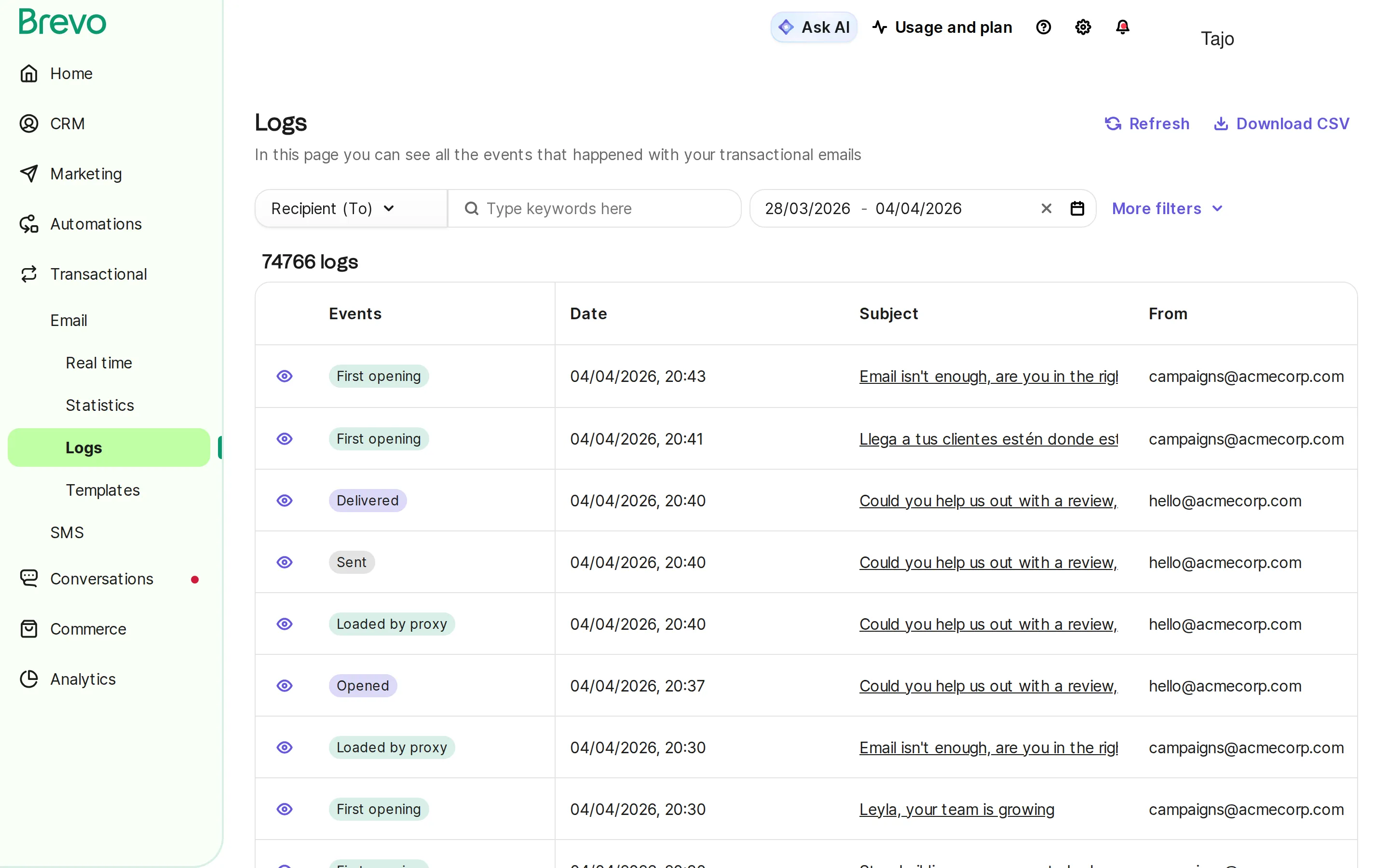
Continuous monitoring ensures transactional emails keep reaching inboxes.
Key Metrics Dashboard
| Metric | What It Measures | Why It Matters |
|---|---|---|
| Delivery rate | Percentage reaching servers | Infrastructure health |
| Bounce rate | Failed deliveries | List hygiene issues |
| Open rate | User engagement | Content relevance |
| Click rate | Action taken | Template effectiveness |
| Time to deliver | Speed of delivery | Provider performance |
| Complaint rate | Spam reports | Reputation risk |
Alerting Thresholds
Set up alerts for:
- Delivery rate drops below 98%
- Bounce rate exceeds 1%
- Complaint rate exceeds 0.05%
- Delivery time exceeds 60 seconds
- Authentication failures
Webhook Integration
Integrate delivery webhooks for real-time visibility:
- Delivered - Confirmation of receipt
- Bounced - Hard or soft bounce
- Opened - Engagement tracking
- Clicked - Link activity
- Complained - Spam report filed
- Your applicationAPI or SMTPTriggers the sendConsumes webhookssend request
- Email providertransactional streamSPF, DKIM, DMARCBounce handlingauthenticated email
- Mailbox providerrecipient serverDelivers or bouncesSpam reports
Common Transactional Email Mistakes to Avoid
1. Mixing Transactional and Marketing Infrastructure
Sending transactional and marketing emails from the same IP damages deliverability. Marketing emails naturally have higher complaint rates, which affects your transactional email reputation.
Solution: Use separate sending infrastructure or dedicated transactional streams.
2. Poor Mobile Optimization
Over 60% of emails are opened on mobile devices. Tiny buttons, complex layouts, and unreadable text frustrate customers.
Solution: Design mobile-first with large tap targets, single-column layouts, and 14px+ fonts.
3. Slow Delivery Times
Customers expect password resets within seconds, not minutes. Delayed order confirmations trigger “did it work?” anxiety.
Solution: Use high-performance transactional email infrastructure with sub-10-second delivery.
4. Missing Critical Information
Omitting order numbers, tracking links, or contact information creates support tickets and frustration.
Solution: Include a pre-launch checklist to verify all essential elements are present.
5. No Plain Text Alternative
Some email clients and accessibility tools require plain text. Missing alternatives break the experience.
Solution: Always include a well-formatted plain text version.
6. Ignoring Bounce Management
Failed to process bounces leads to continued sending to invalid addresses, damaging sender reputation.
Solution: Implement automated bounce handling with immediate suppression of hard bounces.
7. Lack of Monitoring
Problems go undetected until customers complain, by then, thousands of critical emails may have failed.
Solution: Set up real-time monitoring with alerts for delivery issues.
Advanced Transactional Email Strategies
Dynamic Content Personalization
Go beyond basic merge fields to create personalized experiences:
- Product recommendations based on purchase history
- Localized content for language and currency
- Conditional blocks based on customer segment
- Dynamic images personalized to recipient
- Predictive content based on behavior patterns
Cross-Channel Coordination
Coordinate transactional emails with other channels:
| Event | SMS | Push | |
|---|---|---|---|
| Order placed | Detailed confirmation | Order received | - |
| Order shipped | Tracking details | Shipping alert | - |
| Out for delivery | - | Delivery today | Notification |
| Delivered | - | Delivered confirmation | - |
| Password reset | Reset link | - | - |
A/B Testing Transactional Emails
Yes, you can test transactional emails:
- Subject line variations
- CTA button text and color
- Product recommendation placement
- Email length and format
- Send timing (for non-urgent emails)
Note: Only test elements that don’t affect the core transactional purpose.
Value from Transactional Emails
Transactional emails can support customer experience and retention when done carefully:
- Relevant next-step recommendations in order confirmations
- Referral program mentions in shipping notifications when they do not distract from tracking details
- Review requests with product links
- Loyalty program status in receipts
Keep promotional content secondary and clearly separated.
Transactional Email with Tajo and Brevo
Managing transactional emails across your e-commerce stack requires reliable infrastructure and seamless integration.
Tajo’s integration with Brevo provides enterprise-grade transactional email capabilities:
Reliable Delivery Infrastructure
- 99.9% delivery SLA backed by Brevo’s global infrastructure
- Dedicated sending domains to protect your reputation
- Real-time delivery tracking with webhook notifications
- Automatic bounce handling and list hygiene
E-commerce Integration
- Automatic order triggers from Shopify and WooCommerce
- Real-time data sync for accurate personalization
- Template management with dynamic product blocks
- Multi-language support for international customers
Unified Customer Communication
- Single platform for transactional and marketing
- Cross-channel coordination with SMS and WhatsApp
- Consistent branding across all touchpoints
- Centralized analytics for complete visibility
Developer-Friendly
- RESTful API for custom integrations
- SMTP relay for legacy systems
- Pre-built templates for common use cases
- Comprehensive documentation and support
Why Choose Tajo for Transactional Email
Tajo bridges the gap between your e-commerce platform and Brevo’s transactional email infrastructure:
- Zero-code setup - Connect Shopify in minutes
- Automatic data sync - Customer, order, and product data flows in real-time
- Pre-built workflows - Order confirmations, shipping notifications ready to use
- Unified customer view - See complete customer history across all channels
- Multi-channel orchestration - Coordinate email, SMS, and WhatsApp for critical updates
Conclusion
Transactional emails are the foundation of customer communication. When order confirmations, password resets, and shipping notifications reliably reach the inbox, customers trust your brand.
Success requires:
- Proper authentication (SPF, DKIM, DMARC)
- Separated sending streams from marketing
- Clear, focused content with minimal promotion
- Continuous monitoring of delivery metrics
- Reliable infrastructure that scales with your business
The investment in getting transactional email right pays dividends in customer satisfaction, reduced support costs, and brand trust.
Ready to ensure your transactional emails always reach the inbox? Get started with Tajo for reliable transactional email infrastructure powered by Brevo.
Frequently Asked Questions
What is transactional email?
Master transactional emails with this complete guide. Learn about order confirmations, password resets, and how to ensure critical emails reach the inbox.
How do I get started with transactional email?
Start with the fundamentals: understand core concepts, choose the right tools, and implement step by step. This guide covers everything from beginner to advanced.
Which tools support transactional email?
Common transactional email tools include Brevo, Postmark, SendGrid, Mailgun, Amazon SES, and other SMTP/API providers. Choose by setup path, logs, webhooks, suppression handling, support, pricing model, and how well the provider fits your application or ecommerce platform.
Do transactional emails require an unsubscribe link?
No, legally transactional emails do not require an unsubscribe link because the recipient triggered the message through their action. However, some regulations and best practices suggest including one for service-related transactional emails (like shipping notifications) as a courtesy. Never include unsubscribe for critical messages like password resets or security alerts.
Can I add promotional content to transactional emails?
Technically yes, but with caution. The CAN-SPAM Act focuses on the primary purpose of the message. If the commercial content overwhelms the service information, the message may be treated as commercial email and require marketing-email compliance handling. Keep any promotional module clearly secondary and separate from the transactional information.
What's the best time to send transactional emails?
Immediately. Unlike marketing emails where timing affects open rates, transactional emails should be sent as soon as the triggering event occurs. Users expect instant confirmation of their actions. Delays of even a few minutes for password resets or order confirmations create anxiety and support tickets.
Should I use a dedicated IP for transactional email?
For high-volume senders (50,000+ monthly transactional emails), a dedicated IP is recommended. It isolates your transactional reputation from marketing sends and gives you full control over your sender reputation. For lower volumes, shared IPs from reputable providers like Brevo often provide sufficient deliverability since the provider maintains overall IP reputation.
How do I handle bounces in transactional email?
Hard bounces (invalid addresses) should trigger immediate suppression - never send to that address again. Soft bounces (temporary issues like full inbox) should retry with exponential backoff: wait 15 minutes, then 1 hour, then 4 hours. After 3 soft bounces, treat the address as a hard bounce. For transactional emails, also trigger an alert to notify the user through alternative channels if critical messages fail.
What causes transactional emails to go to spam?
Common causes include: missing or failing SPF/DKIM/DMARC authentication, poor sender reputation from shared IPs, spam-trigger words in subject lines, missing plain-text alternative, too many images compared to text, broken links, and sending from a newly created domain without proper warm-up. Using a reputable transactional email provider with proper authentication typically resolves most spam issues.
How long should password reset links remain valid?
Best practice is 1-4 hours for password reset links. Shorter is more secure but less user-friendly. Longer than 24 hours creates unnecessary security risk. Always clearly communicate the expiration time in the email. For highest security, also invalidate the link after one use and require a new request for additional reset attempts.
Can I personalize transactional emails?
Absolutely. Personalization improves the user experience and can include customer name, order details, account information, purchase history context, and relevant next steps. Just ensure personalization data is accurate; incorrect names or details in transactional emails damage trust quickly.